RemNote vs Quizlet: Which Flashcard App Is Better?

Every student has to memorize loads of material to pass with good grades. And for this to happen, the sooner the memorization process starts, the better.
And what better technique has proven more beneficial for retaining knowledge for the long run than flashcards?
But flashcards aren’t enough on their own. The method that you use to review flashcards decides how long you’ll remember something for.
Some flashcard tools like Quizlet only offer basic spaced repetition. Others, like RemNote, implement advanced spaced repetition to ensure deeper and long-term learning.
In this article, I compared RemNote and Quizlet side by side based on the key features they both offer.
Let’s start with an introduction to both platforms.
What is RemNote?
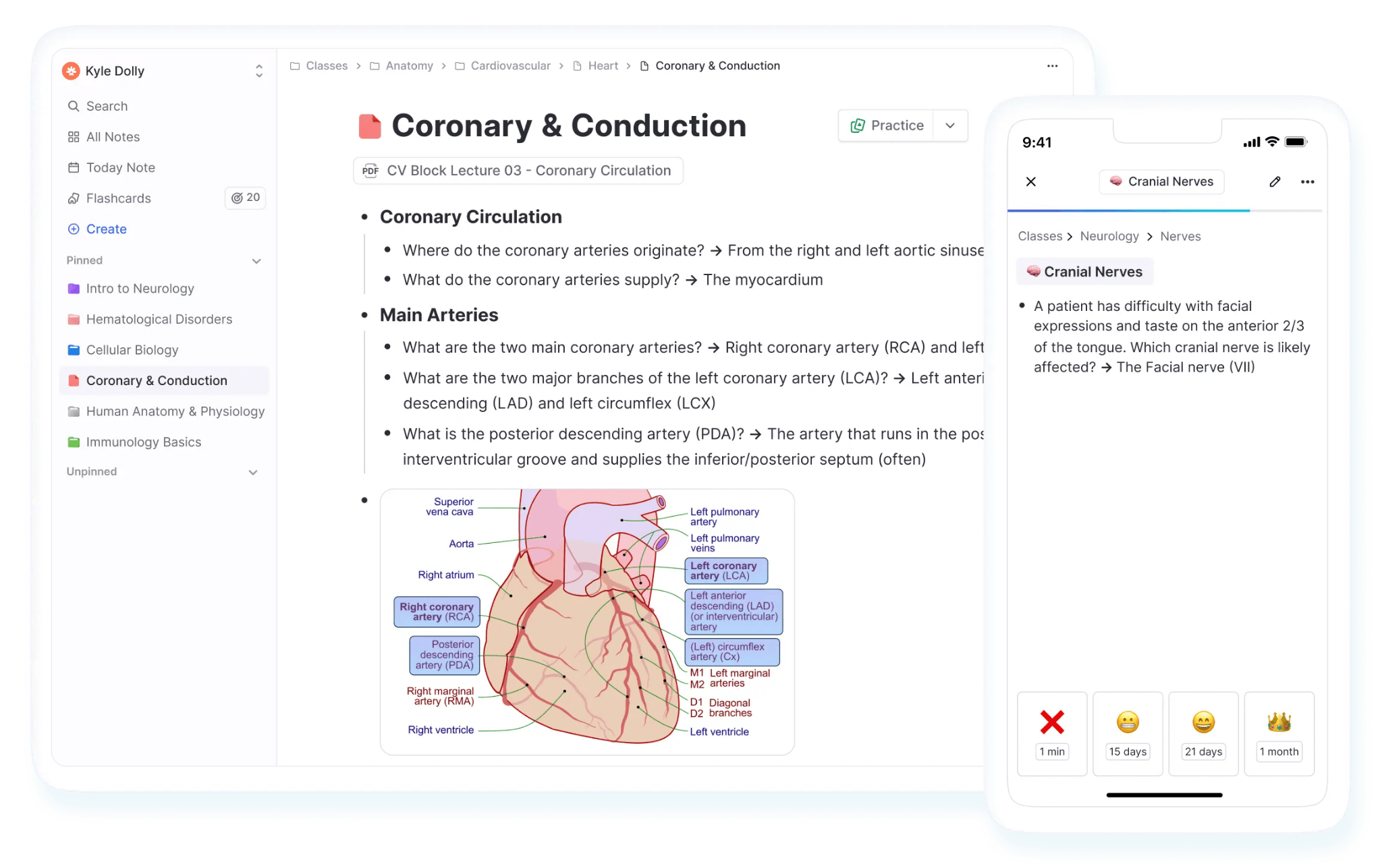
RemNote is a note-taking and flashcard app that helps users learn things long-term.
It lets you take notes and then turn those same notes into flashcards without leaving the app. The app then shows you those flashcards using the spaced repetition algorithm. RemNote supports two spaced repetition algorithms, i.e., the classic Anki SM-2 and the newer FSRS (Free Spaced Repetition Scheduler).
The note-taking feature itself is very comprehensive. The system gives you multiple ways (nested bullets, links, tags, pins, portals, aliases, stubs, knowledge graphs, etc) to form links between related notes and create a connected Knowledge Base.
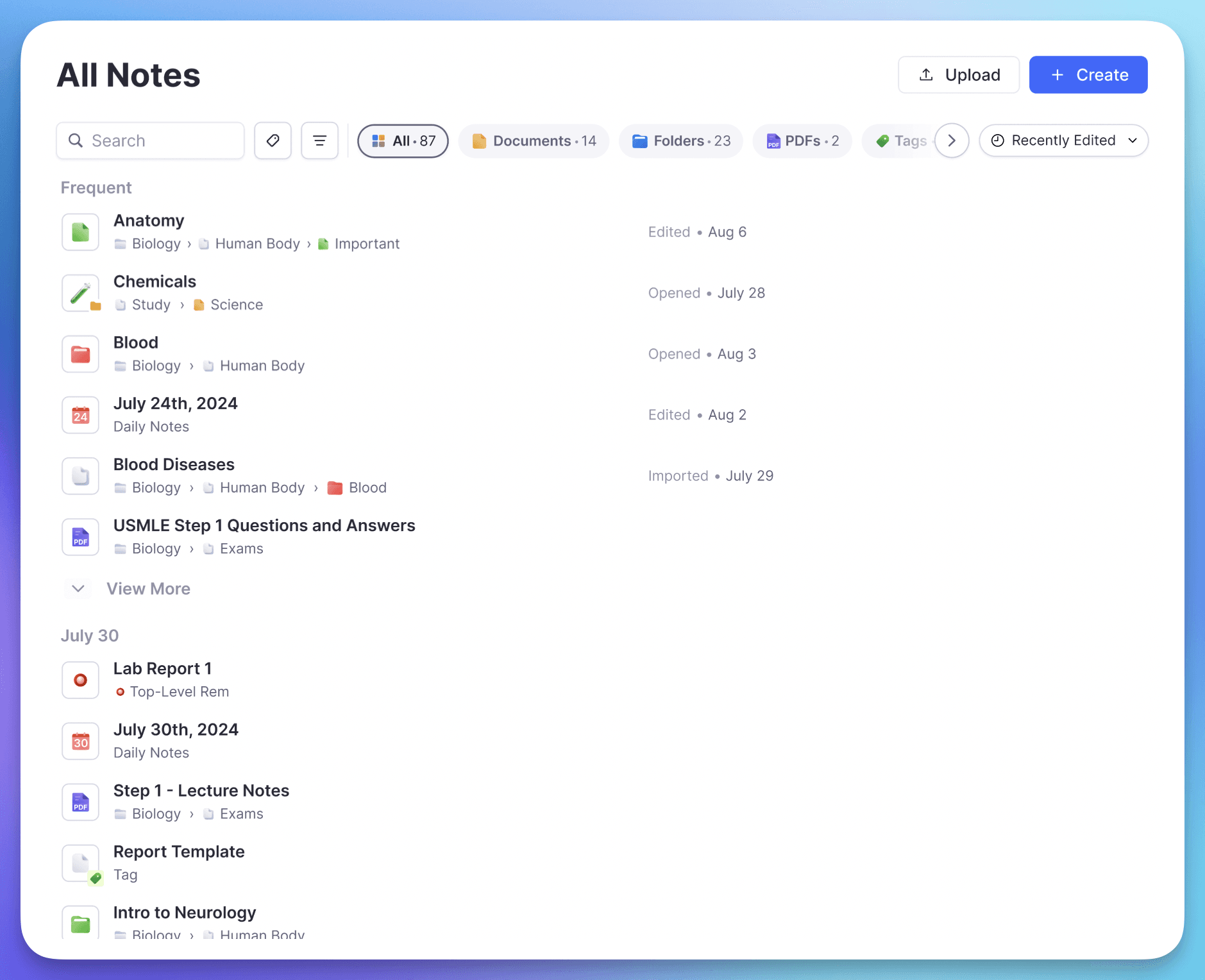
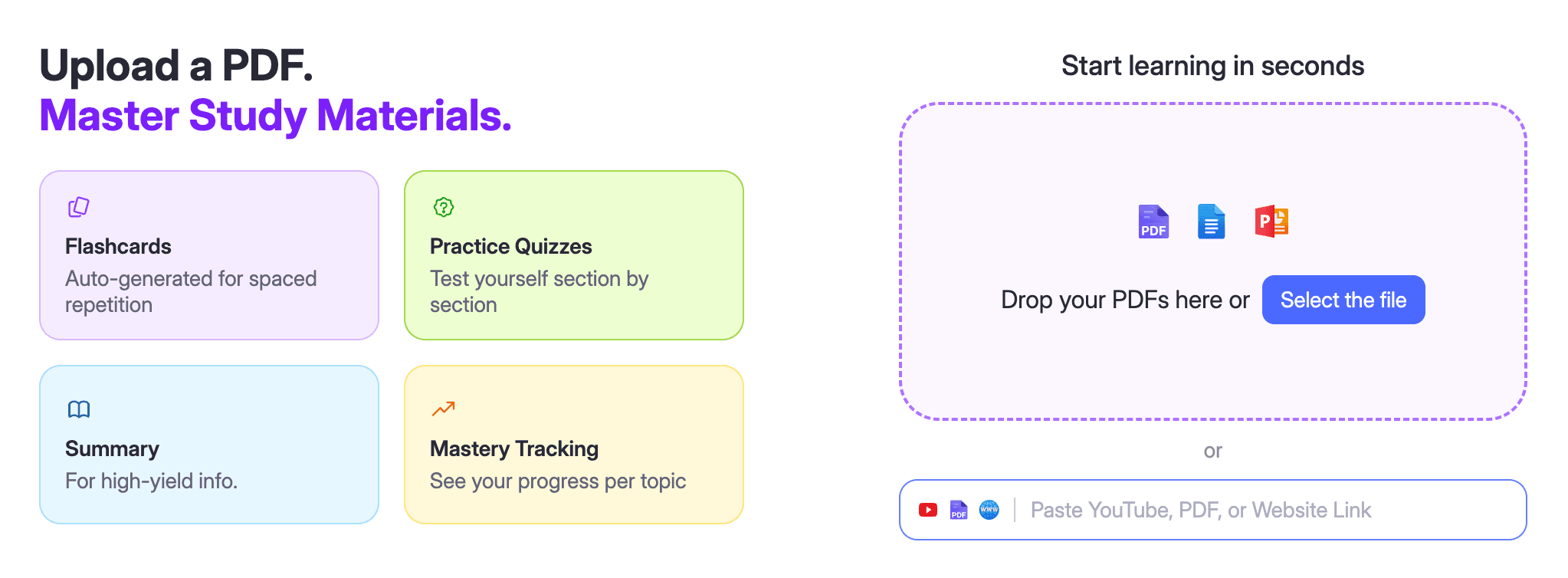
Then there are multiple ways to create flashcards in addition to the one I mentioned (from notes). For instance, you can also create flashcards from uploaded documents or by prompting the built-in AI.
On top of all this, there are a bunch of other useful features. There's PDF annotation, a lecture recorder and transcriber, an exam scheduler, and more.
The best part is that RemNote works offline, and it's available almost everywhere, i.e., on Windows, Mac, Linux, Android, iOS, and Chrome.
What is Quizlet?
Quizlet was a high school student’s project who wanted to help himself memorize French vocabulary for a test.
The tool worked well for him, and after some interest from others, he released it to the public in 2007.
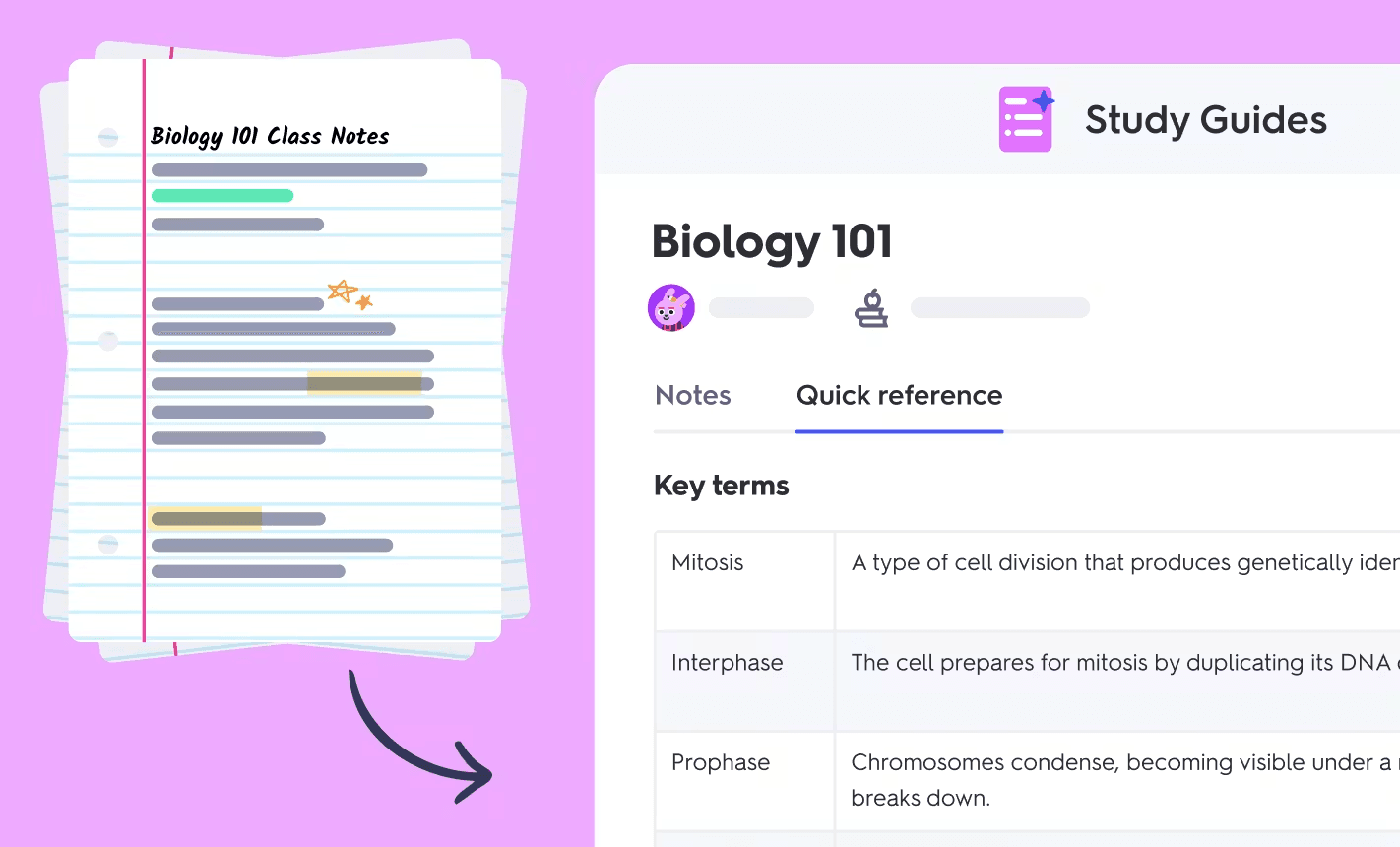
Quizlet is now a popular learning tool that helps people study using flashcards, tests, learning games, and study guides.
But the core of the platform is still flashcards.
Quizlet also offers multiple ways to create flashcards. One way is to make them from scratch. Another way is to upload a document or describe a topic, and let the AI generate flashcards based on that.
When it comes to reviewing the flashcards, Quizlet doesn’t offer advanced spaced repetition. Instead, you study flashcards through some basic and gamified ways that keep you engaged. However, this flashcard study method that Quizlet uses isn’t as effective and science-backed as the spaced repetition method that RemNote uses.
Quizlet also features a library of expert-written textbook solutions and Study Groups where students share decks and keep track of each other's progress.
There are some teacher-facing features as well, namely Quizlet Live and Blast, that help create fun activities out of a lesson.
You can use Quizlet on the web, and it also has apps for both iOS and Android.
RemNote vs Quizlet: Feature-by-feature comparison
| Criteria | RemNote | Quizlet |
| Best for | Long-term retention and connected notes | Fast drilling and ready-made decks |
| Note-taking | Full note-taking system (nested bullets, links, tags, portals, knowledge graph) | None |
| Ways to make cards | Inline from notes, AI from uploads, PDF annotation | Manual, formatted file upload, Smart Assist (AI) |
| Flashcard types | 6. Q&A, cloze, multiple choice, image occlusion, multiline, concept | 2. Term/definition, diagram (Plus only) |
| Spaced repetition | Anki SM-2 (default) + FSRS 6 (beta, opt-in) | Adaptive Learn mode; no true SR scheduler |
| Review modes | All cards due, Practice All, In Order, Without Recording | Flashcards, Learn (Write/Spell), Test, Match |
| Exam scheduler | Yes. Plans daily reviews around your exam date | No |
| PDF annotation | Yes, with card suggestions from highlights | No |
| Pre-made library | Community. Team-curated guides + shared course materials; still growing | Millions of user-created sets + Expert Solutions |
| Platforms | Windows, Mac, Linux, iOS, Android, web | Web, iOS, Android |
| Offline use | Yes | Paid plans only |
| Free plan | Unlimited notes and flashcards, capped advanced features, no ads | Card creation and basic Flashcards mode, daily caps, ads |
| Paid pricing | Pro $10/mo, or $8/mo billed yearly ($96)Pro with AI $20/mo, or $18/mo yearly ($216)Life-Long Learner $395 one-time | Plus $7.99/mo, or $2.99/mo billed yearly ($35.99)Plus Unlimited $9.99/mo, or $3.74/mo yearly ($44.99) |
| Discounts | 25% education discount on Pro (students, faculty, staff) | No individual student discount; school and group plans only |
Flashcard Creation
Flashcards are a central feature of both RemNote and Quizlet.
Both of them allow you to create different types of flashcards in multiple ways.
RemNote
RemNote gives you three ways to create flashcards.
The first and most unique way is the one I mentioned earlier, i.e., making flashcards while taking notes. In the same window where you're writing your notes, you type a special character called a “flashcard trigger” wherever you want a flashcard, and that piece of information becomes a flashcard.
You have to use a different flashcard trigger based on the type of flashcard you want to create. For instance, == or >> make a basic question-and-answer card, and {{ for a cloze card.
You can see this video to learn how to create all 6 types of flashcards in RemNote.
The 6 Main Flashcard Types In RemNote - Spaced Repetition
If you aren’t taking notes, you can generate flashcards with AI. In this method, you upload your study material, and RemNote’s AI suggests flashcards from it. The material can be any format, including PDFs, documents, presentations, images, text files, webpage URLs, YouTube video links, etc. You can also import content from Anki, Quizlet, Notion, and Obsidian.
The third method is through PDF annotation. You can upload a PDF to RemNote’s PDF reader and highlight text inside it just like you do with a physical book. RemNote suggests flashcards based on these annotations. You have the choice to either accept the suggested cards, edit them, or discard them.
With all these methods, you can create the following types of flashcards:
- Question and answer
- Cloze
- Multiple choice
- Image occlusion
- Multiline
- Concept cards
RemNote also lets you add code blocks to your cards. You can try creating flashcards from your notes in RemNote for free.
Quizlet
In Quizlet, you have three ways to create flashcards, too.
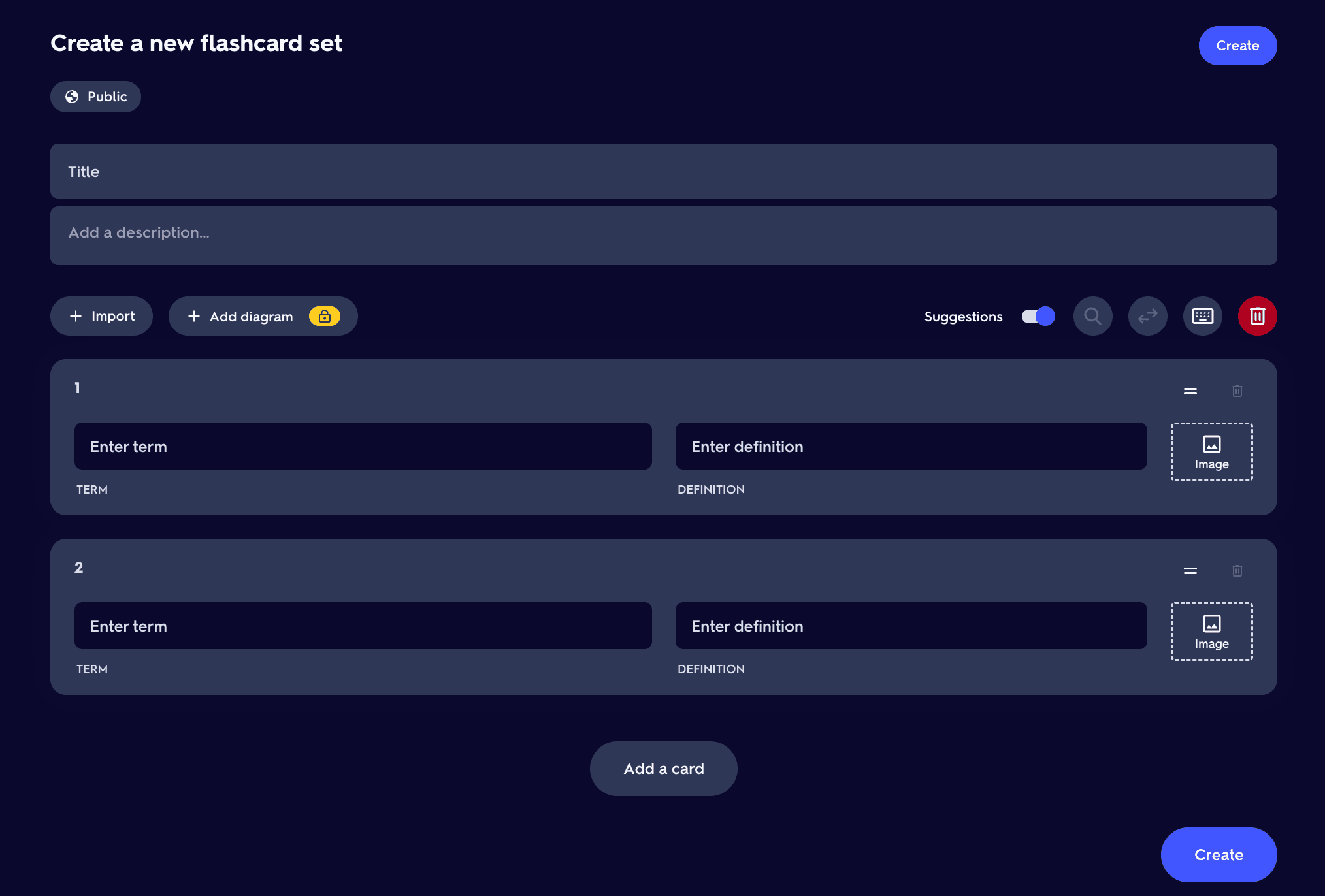
There’s a manual method where you enter the term and corresponding definition yourself. You have the option to add an image to a card as well.
Then there’s the method where you upload a Word document or a spreadsheet for Quizlet to automatically generate flashcards from it. This might sound effortless, but it isn’t. You have to organize the content of your document in a specific format first, e.g., a comma or a dash between the term and the definition, and a new line for each card.
But there’s an actually low-effort method available too. Quizlet offers an AI feature called Smart Assist, which can generate flashcards from documents even if they don’t follow a specific format.
Quizlet supports two flashcard types only. You can either create term and definition cards or diagram cards, where you label parts of an image.
Spaced Repetition
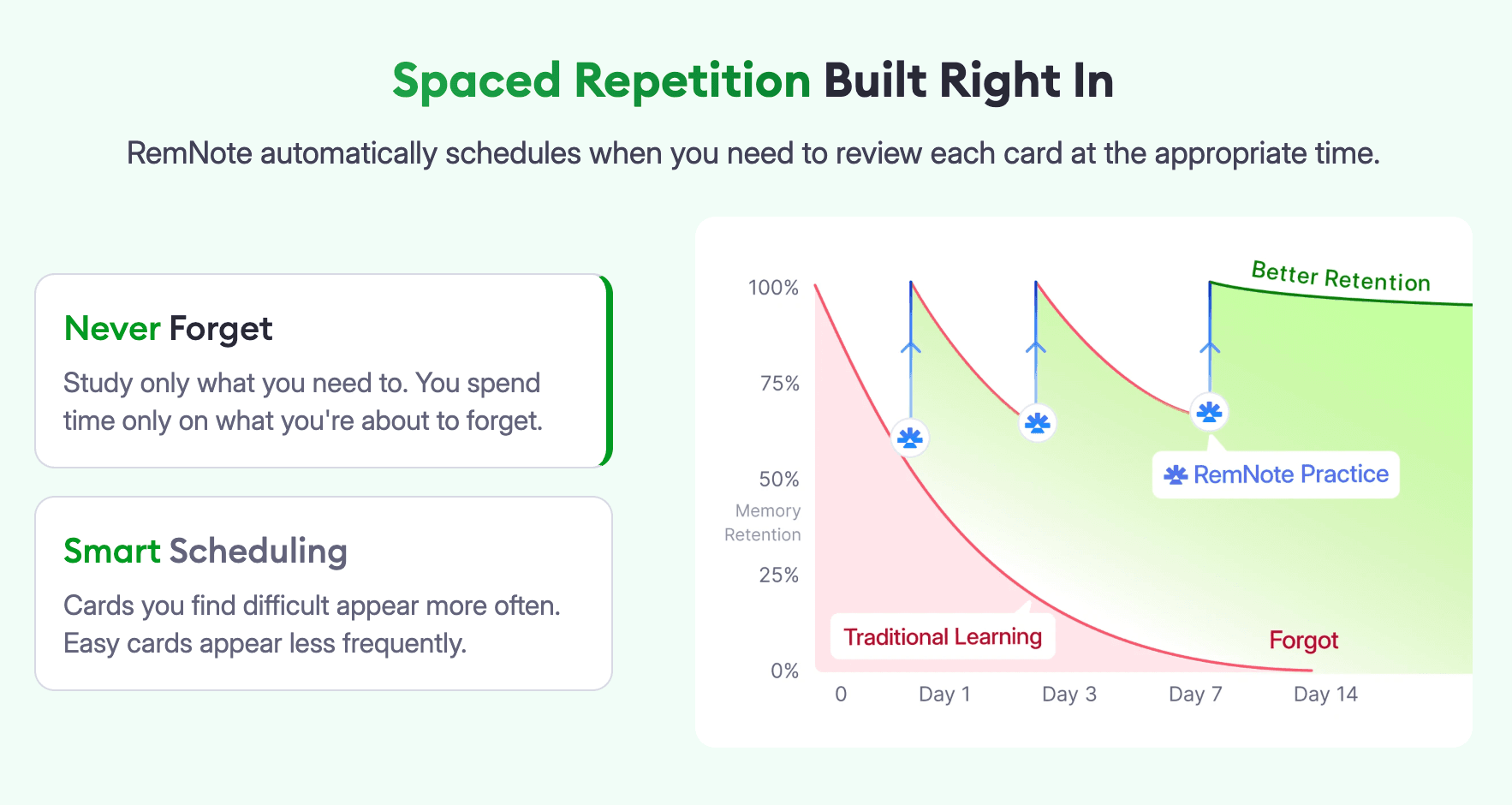
Spaced repetition is the method that tests your memory just as you are about to forget the material. In terms of flashcards, this method shows you a card just as you’re about to forget it. When you successfully recall a card, that means your memory of it is strong, so the algorithm schedules the next review of that card after a longer gap.
Spaced repetition has strong scientific backing for its ability to strengthen long-term retention and fight the natural forgetting curve.
Here’s how RemNote and Quizlet implement this technique:
RemNote
For RemNote, spaced repetition is the core of the tool. It’s one of the major reasons why users choose RemNote.
You can choose to review your cards using either of the two different spaced repetition algorithms. You can either use the classic algorithm Anki SM-2, which is selected by default, or you can switch to the modern FSRS (Free Spaced Repetition Scheduler).
RemNote's implementation of both of these algorithms is advanced.
The modern FSRS is said to be more accurate. It achieves the same level of retention as Anki SM-2 but in fewer reviews.
RemNote supports the latest version, FSRS 6.
Here is how reviewing a card in RemNote works:
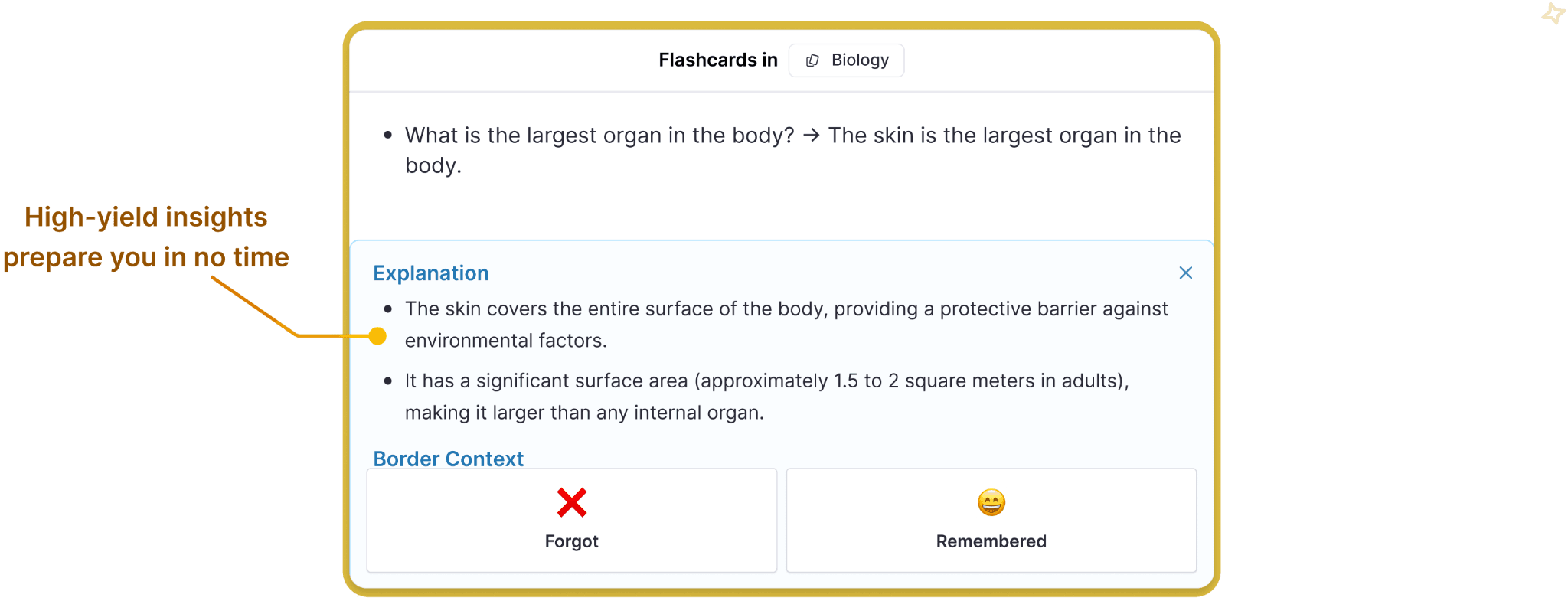
You are shown a card and given one of the following four options to rate your recall of the answer:
- Forgot
- Partially recalled
- Recalled with effort
- Easily recalled
The option you pick decides when your card will appear next. For instance, if you couldn’t recall the answer on a card and chose “Forgot,” the card will come back within minutes. But if you could easily recall the answer, the card might not reappear for a long while.
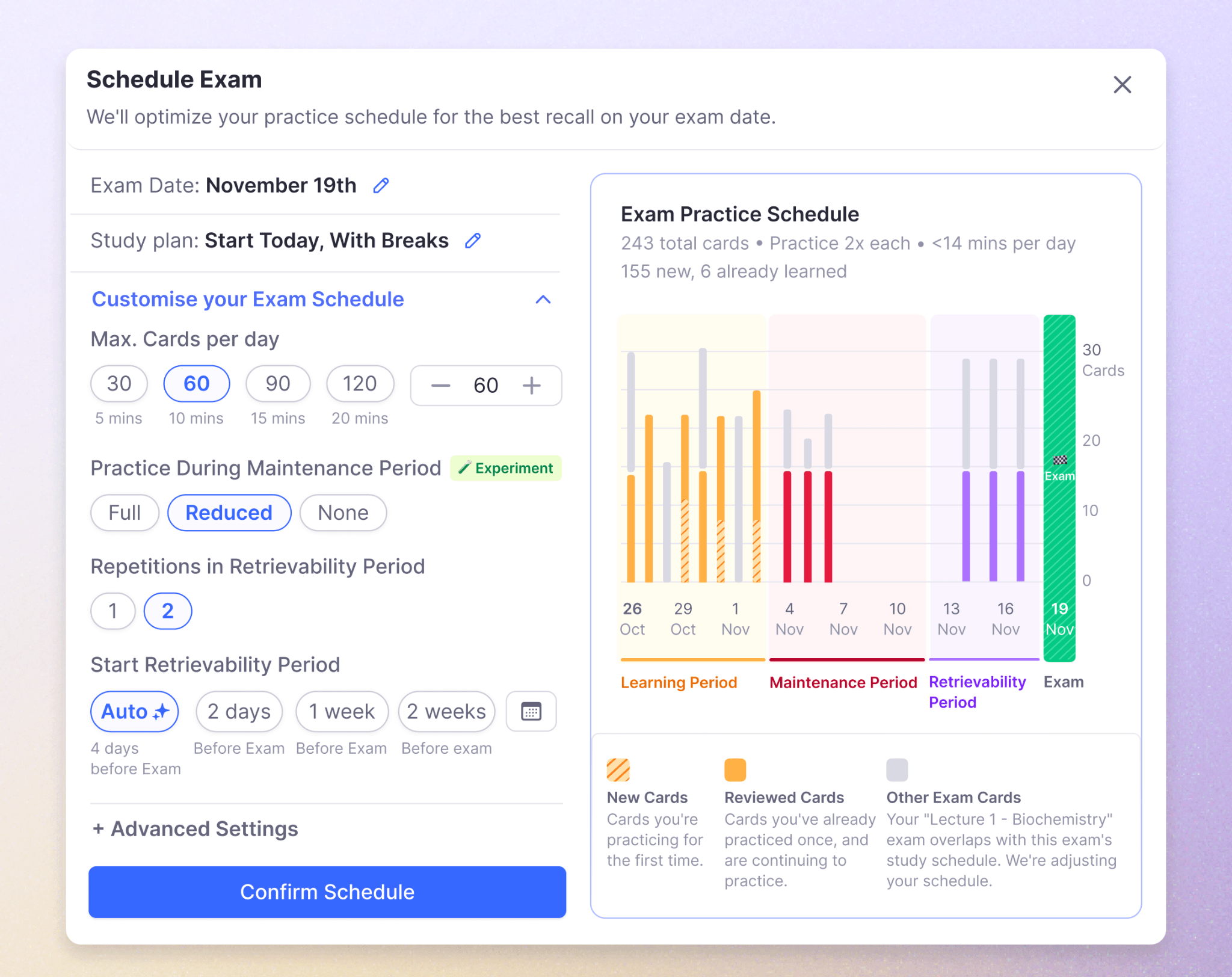
On top of all this, RemNote also offers an exam scheduler that takes your exam’s date as input and plans the daily reviews of flashcards in such a way that you’re fully prepared on the day of the exam.
Quizlet
Quizlet takes a lighter-touch approach to spaced repetition.
Its implementation of the algorithm is very basic.
There’s a Learn mode where cards you struggle with are shown to you more often than the ones you know well. But the scheduling isn’t advanced to ensure long-term retention within fewer reviews.
Study & Review Modes
RemNote
RemNote has multiple review modes.
The main review mode, called all-cards-due, only shows you the cards that are due for review at the moment. The spaced repetition algorithm decides which cards are due based on your rating of cards from the past review sessions.
Apart from this default review mode, RemNote gives you the following review modes:
- Practice All: You review every card in the deck.
- In Order: The cards are shown to you in the same sequence as the notes they come from.
- Without Recording: You practice cards without affecting their spaced repetition schedule.
Quizlet
Quizlet’s most basic review mode is the Flashcards mode, where you flip cards to reveal their answers like you would with physical flashcards.
Then there's the Learn mode, which shows you flashcards, multiple-choice questions, written answers, and spelling exercises through its Write and Spell activities.
Once you have prepared yourself in Learn mode, you can use the Test mode.
In Test mode, Quizlet generates a practice test from your flashcards. You get to specify the number of questions you want and the types they should be. After attempting the test, you get your score along with the correct answers.
Pre-made Content Library
In both RemNote and Quizlet, you might not have to create flashcards from scratch many times. That’s because someone might have already made flashcards on the same topic and shared them through the pre-made content library of these platforms.
Both platforms host libraries of shared content.
RemNote
RemNote’s shared library is called Community.
There, you’ll find short study guides for learning a topic and flashcard decks spanning subjects and grouped into sub-subjects.
All materials you’ll find in Community are prepared by the RemNote team, except for the public courses shared by others.
In Community, you can also join courses shared there by others from your school or university and save the materials to your notes. You can also contribute to these courses by sharing your own materials there.
That said, RemNote’s shared collection of flashcards is still growing. You won't find the same endless variety of ready-made sets on every topic there.
Quizlet
Quizlet's library is one of its biggest strengths because it’s huge and covers many subjects and sub-subjects.
You'll find decks for history, anatomy, organic chemistry, AP exam prep, nursing certifications, foreign language vocabulary, law, coding, and plenty more.
There are usually hundreds of flashcard decks on every sub-subject in Quizlet’s library.
And these flashcards are shared by community users like you.
Quizlet also has a separate library called Expert Solutions. Here, you’ll find step-by-step answers to exercises from popular textbooks written by subject-matter experts (also AI-generated) and checked for accuracy by the platform.
Pricing
Finally, let's talk about what each tool costs.
RemNote
Here's RemNote's pricing table:
| RemNote Plan | Price |
| Free plan | $0/month |
| Pro | $10/month billed monthly, or $8/month billed annually |
| Pro with AI | $20/month billed monthly, or $18/month billed annually |
| Life-Long Learner | $395/one time |
| Life-Long Learner with AI | $395/one time + $10/month for AI features |
RemNote offers a free plan that’s genuinely useful. You are given access to a limited use of many advanced features.
There are no ads to deal with even in the free version.
And when it comes to paid plans, verified students get a 25% discount on the price.
RemNote even has a lifetime plan that costs a one-time fee of $395.
Quizlet
Here's how Quizlet's plans break down:
| Quizlet Plan | Price |
| Quizlet Plus | $7.99/month |
| Quizlet Plus Unlimited | $9.99/month |
| Quizlet Plus for Teachers | 30-day free trial, then $35.99/year |
Quizlet does have a free plan as well. But it gives you a very limited number of features. You cannot make meaningful use of Quizlet on a free plan. The worst part is that the free version shows you ads.
Most of Quizlet’s useful features are locked behind the paywall.
But even the starting paid plan can feel limited.
For example, you get 20 rounds of Learn questions per month and 3 practice tests per month on the Quizlet Plus plan.
Where Does RemNote Take the Edge?
Quizlet does a lot of things well. It's beginner-friendly, and its library of pre-made decks is hard to beat.
But at the same time, it’s not a solid choice for long-term knowledge retention through flashcards.
It only supports two flashcard types, and its spaced repetition algorithm is a pseudo-implementation. You cannot take notes in Quizlet either.
These areas are where RemNote takes a clear edge.
You get to take notes and study with flashcards within the same system. There are far more flashcard types supported, which you review through two research-backed spaced repetition algorithms, i.e., SM-2 and FSRS.
Give RemNote a try for free and retain what you study for a long time.