How to Organize Notes for Learning: A Complete Guide
You’ve been diligently taking notes all semester, except some are in Google Docs, some on the back of your assignment paper because your laptop battery died mid-lecture, and others are screenshots and PDFs you have been meaning to organize on your computer.
Taking notes is great. In fact,t research from the UNC Learning Center and others confirms that the act of note-taking itself, not just reviewing them later, actively improves learning by forcing you to process and organize information as you go. What’s missing in most cases is not good notes but organized notes.
Organizing your notes is important. Many students get stuck in the re-reading trap. For your notes to be effective studying tools, you need to review the information in a structured format and preferably using spaced repetition.
In this guide, we will show you the best way to organize your notes for learning, including: the workflow you can set up today, the classic systems you can use,se and digital tools that make your notes stick.
TL;DR
- Stick to one system for taking notes all semester (paper, digital, or hybrid) and stick with it.
- Organize your notes in this order: subject, then topic within each subject.
- Learn and use a consistent note-taking structure (Cornell, outline, or mapping)
- Review and clean up your notes after taking them.
- Convert your most important concepts into flashcards
Organize by Subject and Topic
The first decision you have to make is how to structure your notes. Most students do best when their notes are organized by subject first (ex., Biology) and topic after, and within each subject (Ex,. Cell Biology, Cell Division, etc.)
Organize by subject
The first step to effective organization is to keep your workspaces separate. Create one notebook, folder, or workspace per class and don’t mix subjects in the same space. This might sound obvious, but few do it, leaving notes messy and harder to organize when they need them.
Organize by topic within the subject
Once you have your notes in one big pile, you can organize them by topic. Avoid organizing by date, which will make your notes harder to search later. Topic- based notes are easy to search and help you with retention.
Note-Taking Systems Worth Knowing
Did you know that there are specific note-taking systems out there? Writing things down randomly during a lecture works for some, but if you want to go pro with your notetaking- to- studying workflow, you might want to consider one of these:
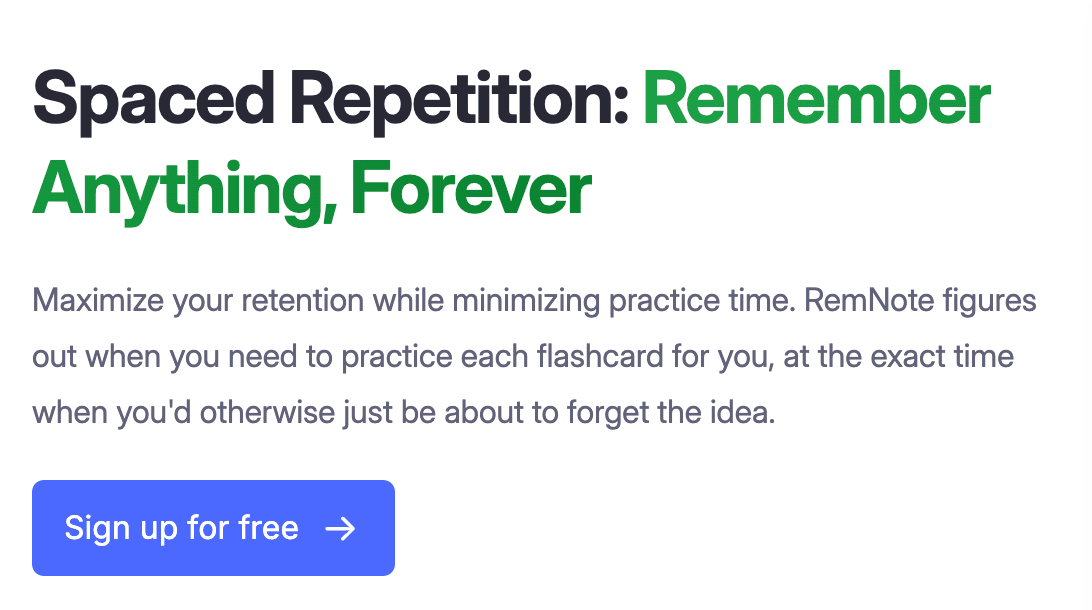
The Cornell Method
Developed at Cornell University in the 1940s, this system divides each page into three sections: a narrow left column for cues (key terms and questions), a wide right column for notes, and a summary section at the bottom.
Advantages
Dividing your notes into dedicated columns forces you to separate your notes into useful chunks. Each column becomes an instant study tool, so less note processing is needed later.
Where to use it
Lecture-heavy humanities and social science classes with lots of terminology.
Limitations
Less useful for science or engineering classes where notes are predominantly diagrams or equations.
Mind Mapping
Mind mapping is a type of note-taking where you start with a central concept and branch outward into related ideas in a visual, non-linear way.
Advantages
This method is great for showing the relationships between concepts, especially when the information is non-linear yet interconnected.
Where to use it
Use in subjects like literature, the arts, philosophy, and biology where concepts relate but not always in a straightforward way.
Limitations
This form of note-taking is hard to pull off in real time during a lecture. It is better used as a review tool to help you understand concepts and relationships.
The Outline Method
This method is the closest to what students naturally default to. Notes are structured in a visual hierarchy with main ideas at the top, and details indented underneath each main idea.
Advantages
Similar to how word processing programs (Word, Docs) handle organization. These notes are fast to write, easy to read back, and work for almost any topic.
Where to use it
Most lectures, most reading. It's the safe default.
Limitations
Doesn't show relationships as clearly as mind mapping, and doesn't build in a review structure like Cornell.
Digital Note-Taking Apps
Digital note-taking apps have combined many of the techniques above and have upped the game with features like search, cross-linking, and AI. Their biggest advantage is that everything lives in a searchable system and you no longer have to chase content across various formats.
The disadvantage is that many students end up with a beautifully organized app they never actually use to study. The best digital notes are the ones that convert into active study material. More on that below.
Digital Tools for Organizing Notes
There are several digital tools available to make organizing your notes easier. Let’s take a look at how these tools can integrate into your workflow.
AI note-taking
An AI note taker can capture lectures in real time, transcribe them, and organize them so you can focus on understanding and learning. These note takers are especially useful for fast-paced STEM classes.
PDF annotation
Most course readings come in PDF format. Annotating a PDF can be time-consuming when done manually. PDF annotation tools allow you to highlight, comment, and pull key passages directly into your notes, so the reading becomes part of your studying.
PPT annotation
Lecture slides can also serve as excellent study resources if you extract the right information from them. PPT annotation lets you add commentary directly onto the slides, turning them into an excellent study document.
Automatic flashcard generation
Flashcards can be an extremely effective way of retaining information. Organizing your notes into flashcards using a PDF to flashcards converter and other AI-assisted tools can pull key concepts from your notes and readings and turn them into a study deck in seconds.
Best Practices for Organizing Notes
Not all note-taking is created equal. Here are 5 best practices to help you organize your notes.
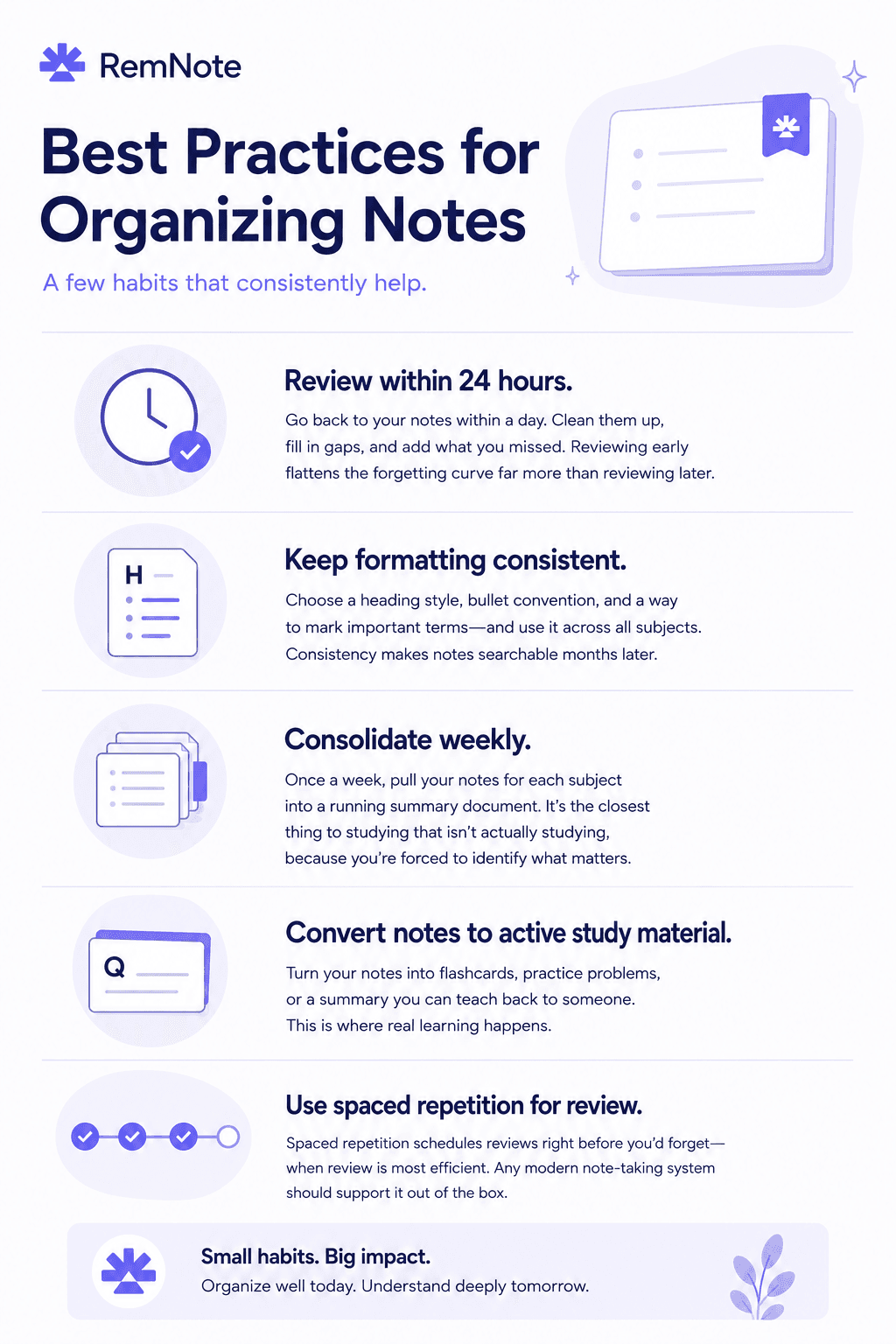
How RemNote Fits In
RemNote is built around the idea that quality, organized study materials shouldn’t take so much time and effort to make. RemNote uses built-in shortcuts to create flashcards as you go, and review them using spaced repetition inside the same app, making your studying a lot more effective and less time-consuming.
Key Features:
- Pre-built study decks cover most common university subjects if you'd rather start from something existing.
- AI flashcard generator can turn a document or PDF into a complete deck in seconds.
If you've been comparing options, our roundups of the best flashcard makers and the best Quizlet alternatives cover the major tools side by side.
FAQs
What's the best way to organize notes for learning?
The best way to organize your notes is to begin with the main subject, then under each subject list the related topics. Use a consistent note-taking system and stick with it. This approach will make organizing your notes easier.
Is it better to take notes on paper or digitally?
Both approaches have their benefits. Manual note-taking has an edge for memory encoding because writing slows you down. Digital notes are more accessible, searchable, and easy to convert to different formats. Many students take a hybrid approach.
How do I stop losing my notes across different apps?
Pick a note-taking system and try to consolidate all your notes with one approach. If you are taking paper notes, take some time each week to scan them into your digital app. Same for screenshots and other formats like PDFs and PPTs. The goal is to keep everything in one place and to organize as you go.
Should I use AI to help organize my notes?
AI can be a great studying tool and can help you with transcribing lectures, summarizing readings, and generating flashcards. AI is less useful for the actual work of learning, which still requires you to engage with the material yourself.