Top 6 AI Quiz Maker Apps That You Should Definitely Try in 2026


A 2017 report by K-12 Market Advisors found that teachers spend 7 hours per week searching for instructional resources and another 5 hours per week creating their own. That's 12 hours a week just on materials, and quizzes are a big part of that workload.
Back in the day, teachers would read through chapters and manually identify areas that were worth quizzing students on.
Then they’d format them in a document and print them for distribution. This was an entirely manual process and could easily eat up a few hours for a single quiz.
But then came quiz maker apps that set teachers free from most of the manual work. They just needed to have the questions prepared. The quiz maker apps provided the rest of the environment for building and distributing the quizzes.
These apps also ended the dependence on paper sheets by making it possible to take quizzes online.
One thing that was still a major hassle for teachers was preparing questions manually. That also ended when quiz makers started using AI. An AI-powered quiz maker only requires you to bring the study material. Everything else from that point is looked after by the quiz maker.
In this guide, you’ll explore the top 6 AI quiz maker apps along with their key features, pros and cons, and pricing details.
But first, let’s cover what an AI quiz maker is in more depth.
What is an AI quiz maker app?
As you just read above, an AI quiz maker app builds the entire quiz from your study materials.
You only need to upload the material in a supported format. That format could be anything, including PDF, typed notes, YouTube link, PPT, etc, depending on the app you’re using.
The tool reads through all of the uploaded material and generates questions on its own. It also decides the number and type of questions on its own, unless you’re using a quiz maker that lets you specify these beforehand.
Many of these tools let you make changes to the AI-generated quiz before finalizing it. They may let you rephrase a question, change its choices, add or remove a question, among other controls.
Some of these tools also let you add multimedia to your quizzes, such as diagrams, graphs, tables, and more.
Another ability they may have is grading and performance tracking. Some quiz generators automatically assign total marks to questions and automatically grade students based on their answers.
They may also keep track of each student or the entire class’s performance over time for analysis purposes. Or they may use this data to train students in areas where they are weak.
That was a basic overview of an AI quiz maker. Let’s learn about other specific features in this list of top AI quiz makers.
Best 6 AI quiz makers in 2026
| App | Best For | Free Plan | Pricing (Monthly) | Rating (Google Play) |
| RemNote | Long-term retention of knowledge through quizzes | Yes | $10/mo (Pro), $20/mo (Pro with AI) | 4.5/5 |
| Edcafe AI | Interactive assessment with instant feedback | Yes | $7.99/mo (Pro), $14.99/mo (Premium) | No ratings yet |
| Wayground | Teachers assessing classes | Yes (for teachers) | Custom (School/District) | 4.7/5 |
| Quizgecko | Customizable quiz difficulty | No (free trial only) | $16/mo (Plus), $29/mo (Ultra) | 4.3/5 |
| Revisely | Generating basic quizzes | Yes (limited) | $12/mo | No ratings yet |
| Forms.app | Quizzes beyond education | Yes | $29/mo (Basic), $79/mo (Premium) | 3.9/5 (App Store) |
1. RemNote (Best for long-term retention of knowledge)
RemNote is a comprehensive study tool that helps you retain knowledge for the long term using quizzes, flashcards, and the spaced repetition technique.
The AI quiz maker is one of its many features.
The quiz-making happens inside RemNote’s dedicated document reader. When you upload documents to RemNote, you can view and perform actions on those docs. You can highlight text, annotate PDFs, and create notes and flashcards from those docs.
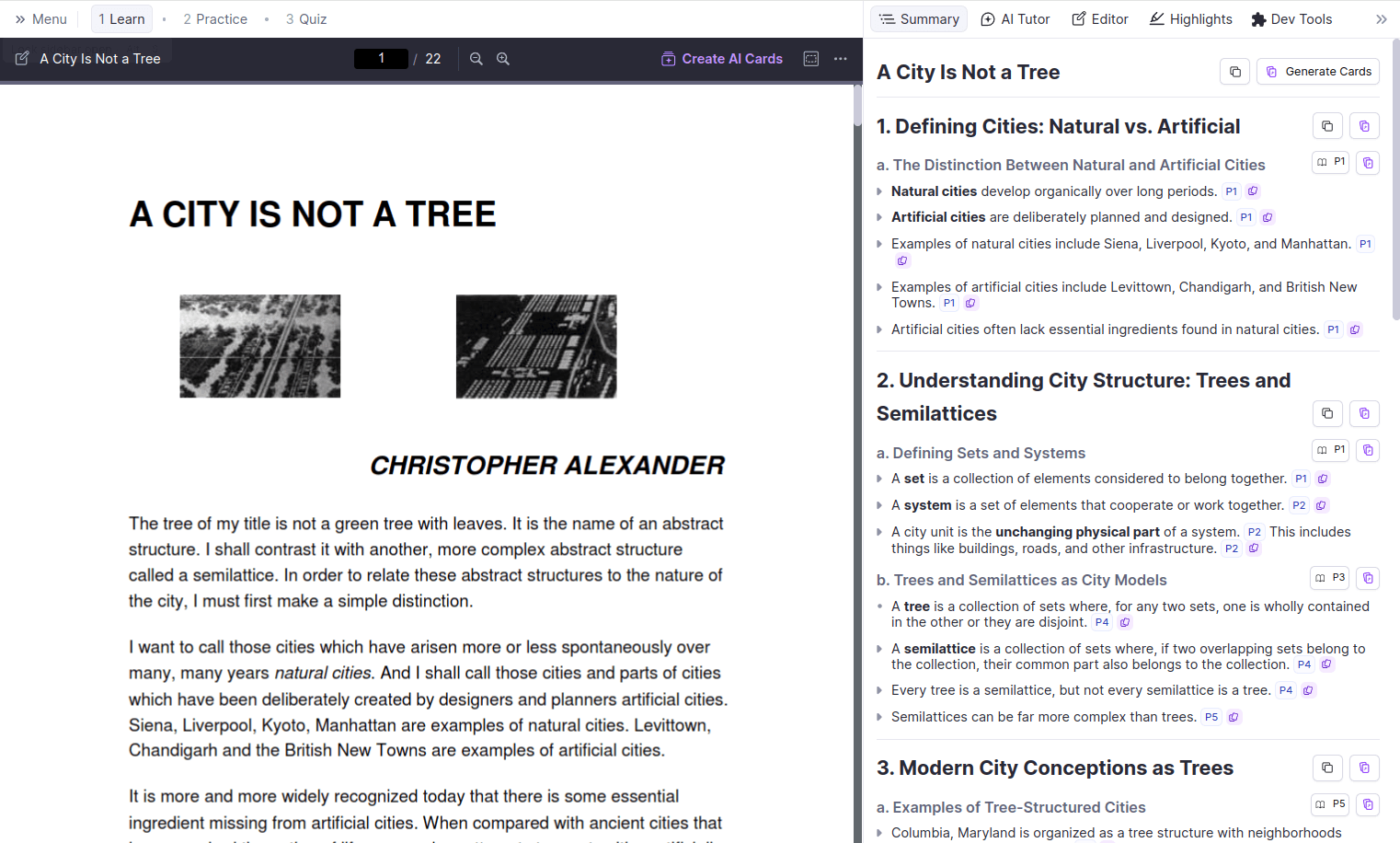
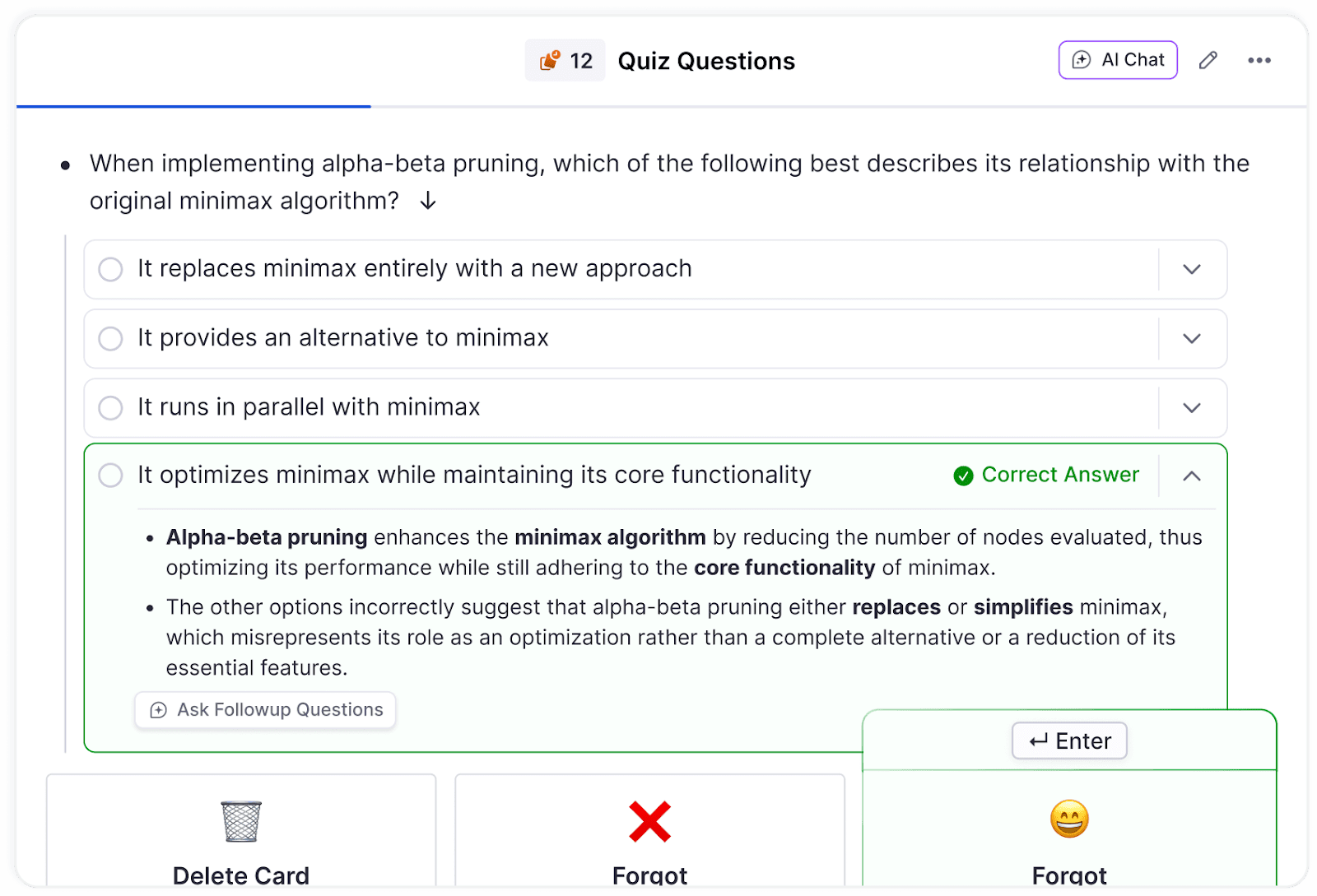
Inside this same reader, there’s a Quiz tab where RemNote’s AI generates multiple-choice questions based on the uploaded document.
RemNote generates this quiz automatically once the document is uploaded.
What’s good about these questions is that you can trace each one of them to the part(s) of the document where the question came from. You can do this by clicking the small pin icon next to each question. Clicking the pin takes you to the exact passage(s) that shaped the question.
The way you take a quiz in RemNote is also unique. The questions are posed to you like flashcards using the spaced repetition technique. The system brings back questions at smartly timed intervals just before you’re about to forget their answers.
If you have an exam coming up, you can also set a specific date, and RemNote will schedule the review of quiz flashcards accordingly to prepare you for the exam.
Key features
- Quizzes contain multiple-choice questions
- AI can generate quizzes from PDFs, URLs, YouTube videos, website links, PPTs, and pasted text
- You can track each question’s context in the document
- Built-in spaced repetition that automatically queues quiz questions for review
- An exam scheduler that adjusts your study plan based on a target date
- Split-screen reader lets you view your source material and quiz side by side
- An AI Tutor that can explain a confusing question or concept
Pros & cons
| Pros | Cons |
| Note-taking, flashcards, quizzing, etc., all in one place | Slight learning curve initially |
| The citation feature helps with understanding the context of AI-generated questions | |
| Integration of the spaced repetition technique | |
| Supports a wide range of input formats |
Pricing
RemNote offers three pricing tiers:
- Free forever
- Pro: US$10/month
- Pro with AI: US$20/month
Lifetime plans are also offered (US$395/one time).
2. Edcafe AI (Best for interactive assessment)
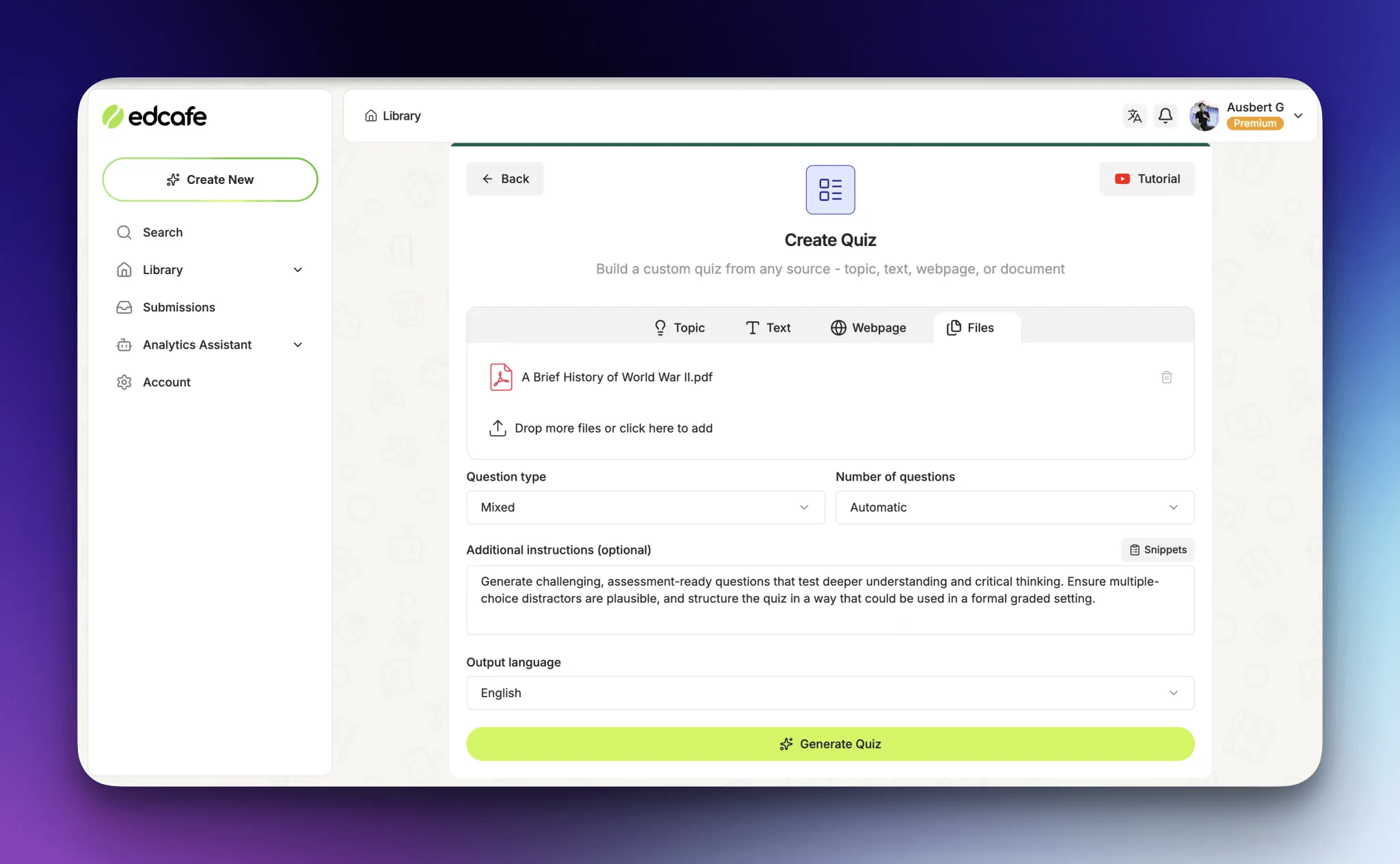
Edcafe AI takes a different approach by focusing on the complete quiz cycle.
Instead of stopping at quiz generation, Edcafe AI creates student-facing quizzes that learners access directly.
And to do it is pretty simple, too.
You first generate quiz questions from multiple input sources: a simple topic prompt, pasted text, webpage URLs (including YouTube videos), PDFs, or Word documents. Then, shape the questions with prompt-based alignment to help you match specific grade levels, difficulty targets, or curriculum frameworks.
What sets it apart is that teachers can deliver quizzes directly to students in three different modes. Classic mode presents the quiz in a form-style. Practice mode gives instant feedback after each question. Assessment mode shows one question at a time with feedback only at the end. Students receive AI-generated feedback immediately after completion.
Teachers access all results through real-time dashboards. Plus, a built-in Analytics Assistant lets you ask questions like "Which students are struggling with fractions?" or "What topics need review?" and get answers pulled from actual quiz data.
Key features
AI quiz generation from topics, text, webpages (including YouTube), PDFs, and documents
Three quiz modes:
- Classic (form-based, summary at end)
- Practice (instant feedback per question)
- Assessment (one question at a time, feedback at the end)
Prompt-based alignment to grade levels, difficulty, and curriculum frameworks
Direct student assignment via shareable link, QR code, or LMS integration
Instant grading and feedback delivered to students upon submission
Real-time teacher dashboards tracking submissions, performance, and trends
Chat-based Analytics Assistant for querying student progress and identifying learning gaps
Export options to PDF, Word, PowerPoint, and Google Forms
Pros & cons
| Pros | Cons |
| Complete workflow from creation to grading to insights | Student access is capped on lower-tier plans |
| Three modes support different learning contexts | Focused on interactive digital assessment than printable quizzes |
| AI grading and feedback are delivered to students on the spot | |
| Analytics Assistant simplifies data analysis through natural language queries |
Pricing
- Forever free plan with monthly usage and student access caps
- Pro plan costs $7.99/month (billed annually)
- Premium plan costs $14.99/month (billed annually)
- Custom pricing available for schools and districts
3. Wayground (Best for teachers to assess classes)
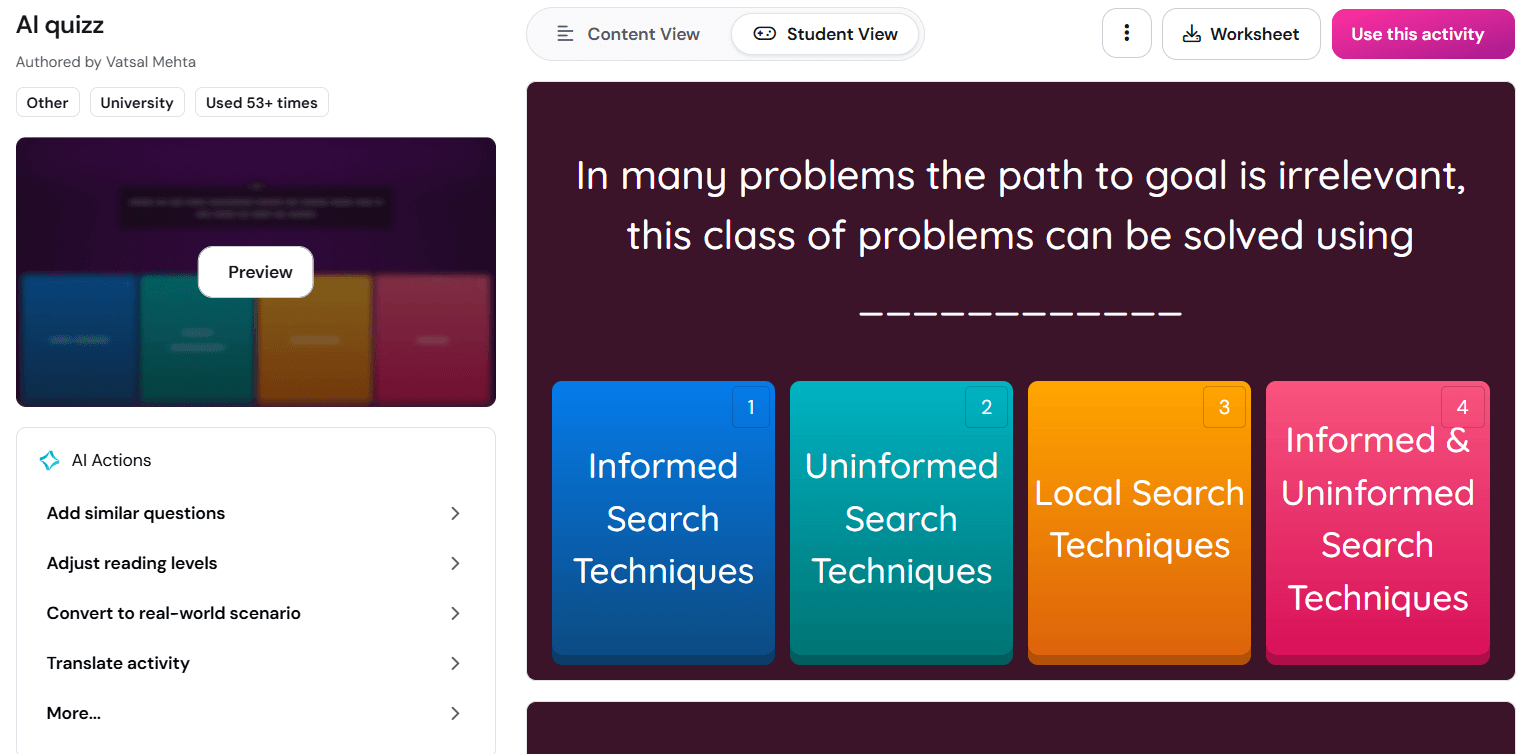
Wayground was previously just a quiz-hosting tool called Quizizz. The platform rebranded to Wayground and is now an AI-powered learning platform for teachers.
Just like RemNote, Wayground generates quizzes from your uploaded documents. The format it supports includes PDF, webpage, Word doc, PPT, Google Drive documents, and typed text.
You can upload any of these to Wayground’s AI studio, and it generates a full assessment, including answer choices and correct answers.
If you don’t have a document to upload, you can also just paste a topic or a detailed prompt explaining what you want in your quiz.
You can also build a quiz from scratch. But even then, the AI stays with you. It observes the first few questions and, based on the pattern, suggests similar or relevant questions to add.
You can also skip building quizzes altogether and try to look for a ready-to-use quiz in Wayground’s library of over 30 million community-created quizzes and lessons.
Once your students have taken a quiz, Wayground generates insights about how students performed individually as well as how the class performed as a whole. This progress can be tracked across multiple quizzes.
The insights can be narrowed down to the specific questions students struggled with, and suggest remediation ideas to help the students perform better the next time.
The platform can also auto-translate your quizzes and adjust reading levels for students who need different levels of support, which is the kind of differentiation that would take a teacher a long time to do manually.
Key features
AI can generate 12-18 question types, including:
- Match the Following
- Multiple Choice
- Fill in the Blanks
- Hotspot
- Labeling
- Audio Response
- Video Response and more
AI can generate quizzes from text prompts, PDFs, URLs, Google Drive files, Word docs, PPTs, and pasted content
You can adjust the reading level and enable translation to accommodate students of all skill levels
You can tag specific state or academic standards to questions to track mastery of required curricula
Questions can have gamification elements, like themes, power-ups, and memes
You can assign quizzes either as a Live session or homework.
Paper Mode lets you conduct quizzes using special answer cards called Q-cards instead of devices.
Advanced analytics show individual student progress as well as class progress
Integrates with Google Classroom, Canvas, and Schoology
Import quizzes from Google Forms and spreadsheets
Pros & cons
| Pros | Cons |
| Wide range of question types | It’s a teacher-focused platform, so it’s less useful for students |
| Accessibility features | Free for teachers |
| Detailed student-level and class-level analytics | |
| Massive community library |
Pricing
- Basic plan with limited features is free for teachers
- School and District plans have custom pricing
4. Quizgecko (Best for customizable quiz difficulty)
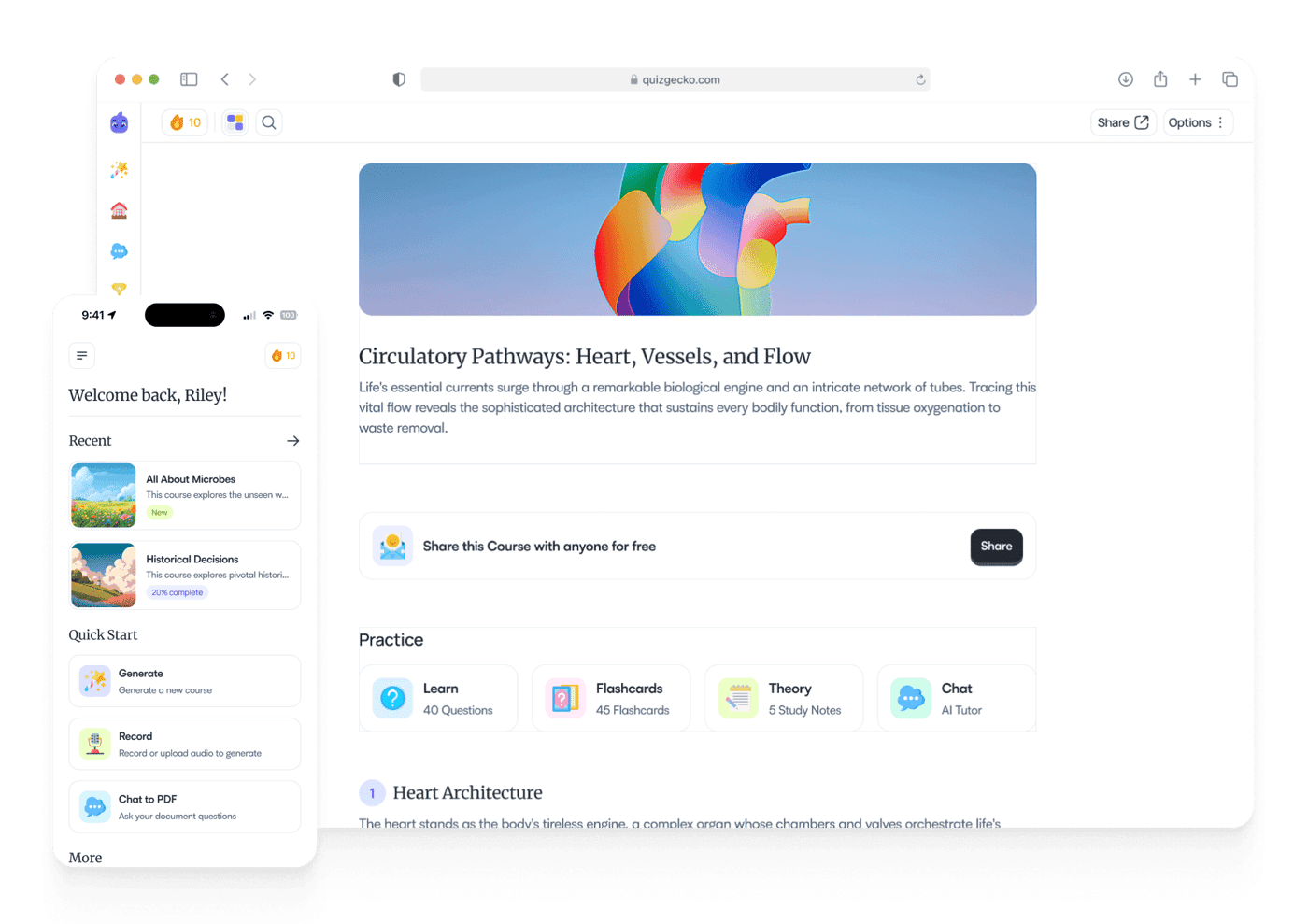
A lot of AI quiz makers are made for teachers or students.
Quizgecko is one of the few that genuinely tries to serve both students and business professionals.
Let’s first talk about the input formats.
Quizgecko’s AI can generate quizzes from a wide range of sources. You can upload PDF, Word doc, PPT, YouTube URL, website link, notes, textbook excerpts, and even a photo of handwritten notes or an audio recording of a lecture. If you have none of these, you can type in a topic or a prompt instructing AI how to build the quiz.
You can also specify the type of questions you want in your quiz and how difficult those questions should be. Quizgecko supports up to 6 question types and 5 difficulty levels. If you cannot settle on a difficulty level, you can leave the decision to AI. The AI reads the complexity of your source material and forms questions that match it.
Another unique Quizgecko feature is its ability to generate plausible wrong answers instead of obviously incorrect ones.
Key features
AI quiz generation from PDFs, Word docs, PowerPoints, URLs, YouTube videos, audio recordings, and handwritten note photos
6 question types:
- Multiple-choice questions
- True/false questions
- Short answer questions
- Fill-in-the-blank questions
- Matching questions
- Select-all-that-apply questions
5 difficulty levels for questions:
- Easy, Medium, Hard, Very Hard, and Mixed
You can guide AI to align questions with specific exam boards (like USMLE or NCLEX)
The AI uses LaTeX/KaTeX to accurately render complex mathematical and scientific equations within quizzes
Quizzes can be exported to PDF, Word, CSV, or Excel for printing
You can add images or GIFs (up to 4MB) to individual questions
Pros & cons
| Pros | Cons |
| One of the widest range of input formats | Too many features can make the interface feel cluttered |
| Interface customization features | |
| Smart distracting MCQ options promote rigorous learning |
Pricing
- Plus plan costs $16/month
- Ultra plan costs $29/month
- Both plans have a free trial
5. Revisely (Best for generating basic quizzes)
Revisely is a basic revision tool with three main AI features. And those three AI features are also basic.
Its AI quiz generator is one of those 3 main features.
Its AI can generate quizzes from PDFs, PowerPoint presentations, Word documents, or textbooks.
You can also upload photo scans of textbooks, and Revisely will extract the text and generate questions from it.
Revisely also has a dedicated option for generating quizzes from video content.
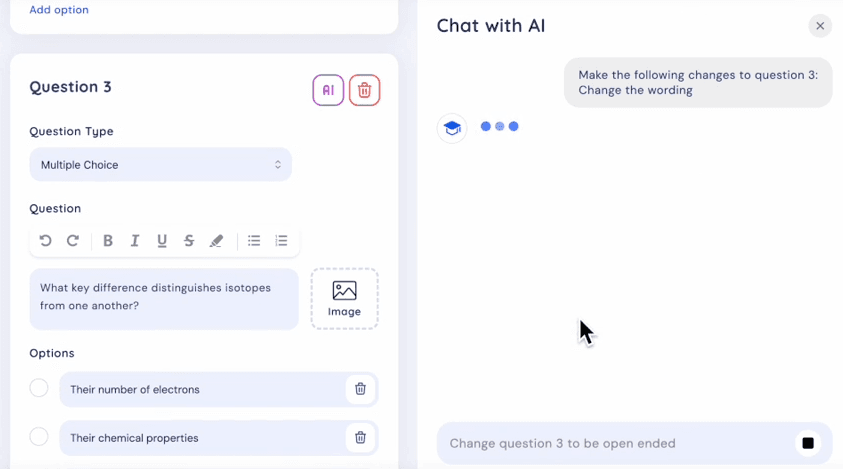
Once Revisely has generated a quiz, you can chat with the built-in AI chatbot and ask it to make changes to the generated questions.
Key features
- Quizzes can be generated from PDFs, Word docs, PowerPoints, pasted text, images, and video
- Three question types: multiple choice, true or false, and open-ended
- AI can provide feedback on open-ended answers instead of declaring them as simply correct/incorrect
- Creates questions suitable for GCSE, A-Level, and AS-Level past paper practice
Pros & cons
| Pros | Cons |
| Simple and easy to use | Limited question types are supported compared to other top AI quiz makers |
| Distraction-free interface | Not made for rigorous preparation |
| Supports multiple curriculum standards (e.g., AQA, Edexcel) |
Pricing
- Free limited plan
- Monthly plan costs $12 per month
- Yearly plan costs $5 per month
- Professional plan costs $19 per month
- Business plan costs $49 per month
6. Forms.app (Best for quizzes beyond education)
Every AI quiz maker covered so far has been built primarily for studying or teaching.
Forms.app caters to a broad range of use cases. Teachers use it, but so do HR teams for assessing their employees, marketers building interactive funnels, and small business owners who want to recommend products based on customer answers.
It is a general-purpose form builder with high-quality quiz-building features.
You have multiple ways to build quizzes. You can either choose a quiz template and populate it with your questions. Or you can describe the quiz to AI and let it generate the quiz for you.
Or you could just give the tool your study material by copying and pasting it, uploading a PDF, or a website URL that hosts the required content.
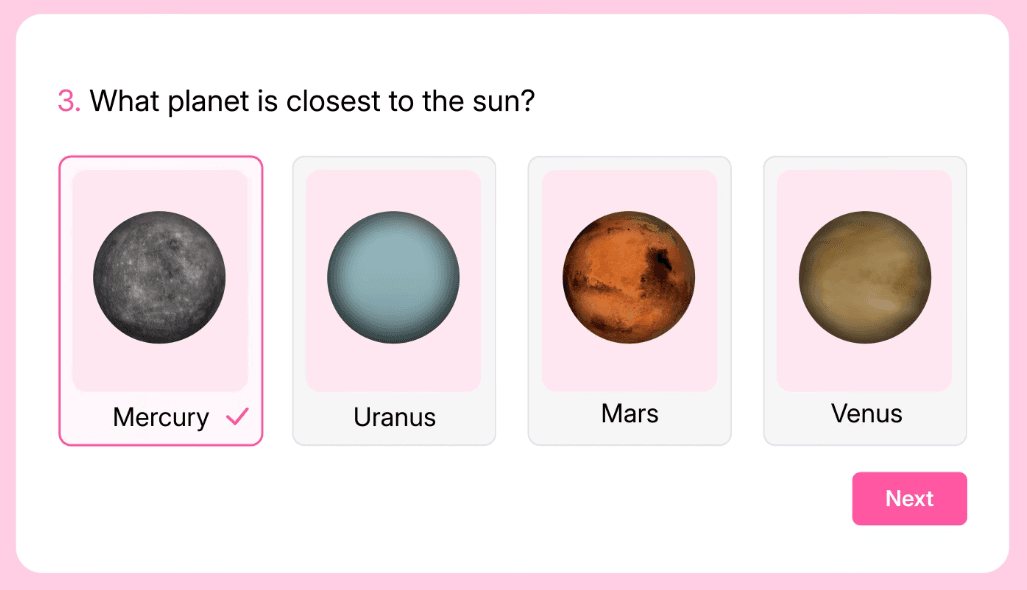
The platform supports over 30 answer field types. Those include your standard multiple choice, true or false, picture selection, reorder options, and open-ended answers.
You can also assign points to positive or negative point values to specific answers, which get auto-assigned when quiz responders select them.
Key features
- AI can generate quizzes from text prompts, pasted content, PDFs, images, and URLs
- You can specify the goal of your quiz, and the AI will generate questions that relate to your goal. The goals can be Educate, Entertain, Engage, Recommend products, and Generate leads.
- 30+ answer field types
- Auto-scoring feature
- The system shows the next questions based on a participant's previous answers
- You can add a countdown or a count-up timer
- Quizzes can have read-only sections with instructions, examples, or rules using text, images, videos, and hyperlinks to guide participants
Pros & cons
| Pros | Cons |
| Nuanced auto scoring | Does not go as deep into study-specific features |
| Branching questions allow for personalized quiz experiences | Expensive as compared to other quiz maker apps |
| Quiz template library | |
| Caters to a wide range of use cases beyond education |
Pricing
- Forever free plan
- Basic plan costs $29/month
- Pro plan costs $39/month
- Premium plan costs $79/month
Why RemNote?
Almost all AI quiz makers in this guide offer quiz-making as a standalone feature. They don’t offer features for training students before testing them with quizzes.
RemNote happens to be the only one to prioritize learning and testing both.
That’s evident from the three tabs on RemNote’s document reader, which are:
- Learn
- Practice
- Quiz
If you’re reading between the lines, you’ll observe that these tabs have a strategic purpose and ordering.
RemNote first makes you learn the content in your document. Then it helps you practice what you learned. And finally, you’re tested with a quiz.
And this entire learning and testing process is complemented by the spaced repetition technique, which makes sure you retain knowledge for a long time.
That is a different value proposition than tools that generate a quick quiz and call it a day.
Sign up for RemNote for free and try it on your next study session.